Interval Guard Desktop
Kalshi interval trading moves fast. Your setup should not be the slow part.
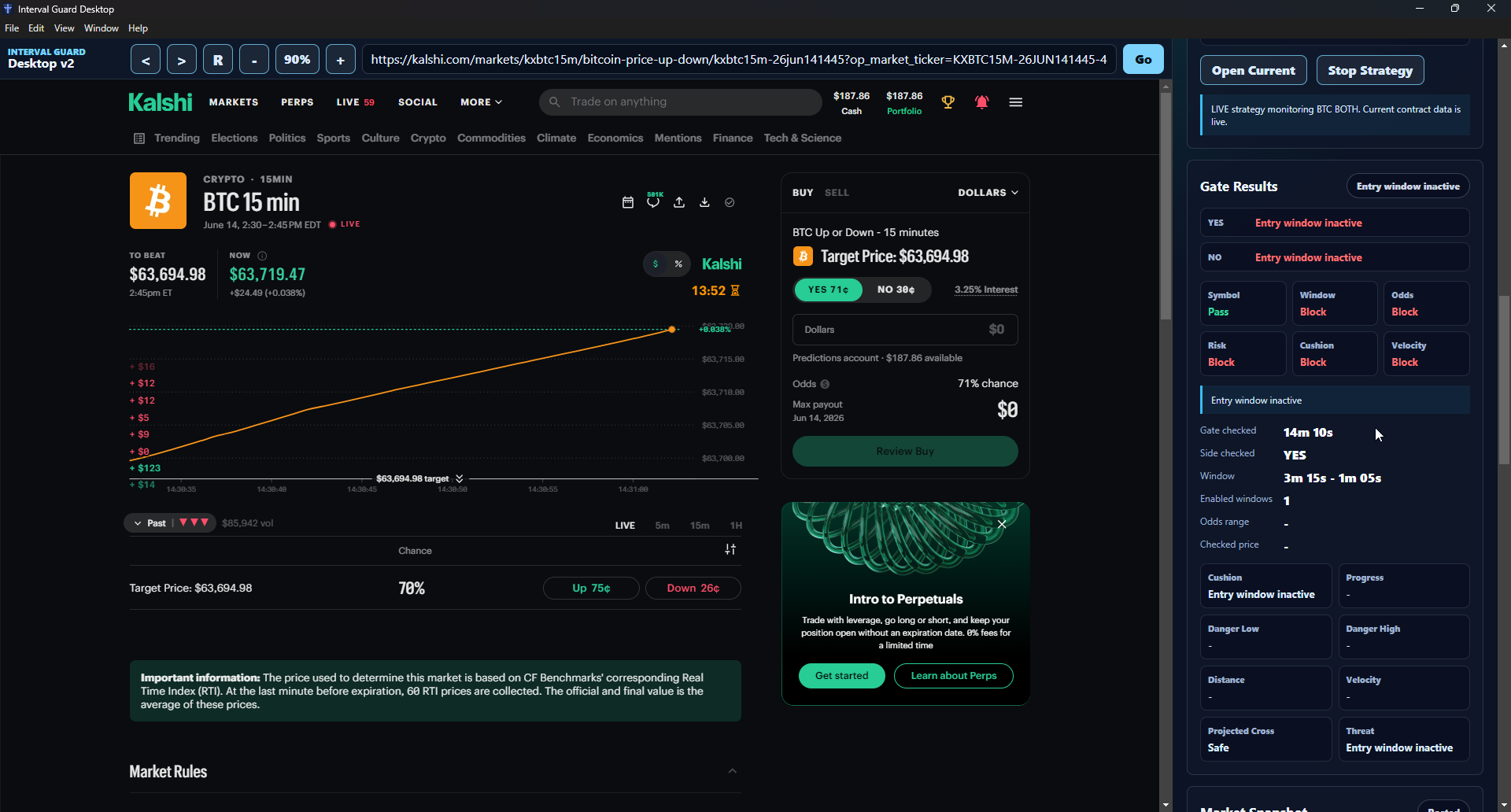
Interval Guard Desktop gives Elite members a controlled workstation for Kalshi 15-minute crypto markets — with paper testing, strategy gates, risk controls, live execution support, and session performance in one place.
Built for traders who need control, not chaos.
Most trading workflows are held together with browser tabs, notes, gut checks, and a prayer. That gets messy fast.
Interval Guard Desktop gives you one focused trading station where you can watch the market, test rules, monitor entries, manage risk settings, and review what actually happened after each session.
It does not promise magic. It gives you structure. Big difference.
One workstation for the whole interval workflow.
Interval Guard Desktop is built around Kalshi 15-minute crypto interval markets. It helps you:
- ✓Run paper strategies before risking real money
- ✓Monitor BTC, ETH, SOL, and XRP interval markets
- ✓Use entry windows and price gates
- ✓Track market snapshots in real time
- ✓Apply velocity protection before entries
- ✓Use stop-loss and target-threat protection after entry
- ✓Review session performance and recent trades
- ✓Keep Kalshi API credentials encrypted locally
- ✓Move into live execution only when your setup is ready
The goal is simple: make the trading process visible, repeatable, and harder to freestyle into a bad decision.
Why Elite members get it.
Interval Guard is not a casual dashboard add-on. It is a desktop trading workstation for operators who want deeper tools, faster feedback, and tighter control over execution behavior. That is why access is included only with Precog Elite.
Elite members get priority access to beta applications like Interval Guard, plus the broader Precog intelligence stack for market research, anomaly detection, backtesting, exports, and advanced signal work.
Paper first. Live when ready.
Interval Guard is designed to start in paper mode. That lets you test the workflow, tune your strategy settings, watch how gates behave, and review session results before you turn on live execution.
Live trading requires the right local setup, active access, enabled live mode, and unlocked Kalshi API credentials.
Because yeah — clicking live without proving the setup first is how people donate money to the market.
The full workstation.
Open Kalshi inside the desktop app and keep your market view, strategy controls, and session data in one workstation.
The local engine handles market snapshots, gate checks, paper trades, live order flow, and runtime status from your machine.
Test your strategy behavior before going live. Review entries, exits, session stats, and trade outcomes without risking capital.
Control when trades can trigger using entry windows, price ranges, symbol checks, risk rules, cushion logic, and velocity protection.
Velocity protection watches how fast the market is moving toward the target before entry. If the move is too dangerous, the system can block the trade before you step in front of it.
Stop-loss logic handles risk after the market crosses the target. Target-threat protection watches open positions before the target gets crossed, giving the system a chance to react earlier.
Track open trades, closed trades, win/loss results, realized P&L, submitted orders, failed orders, velocity blocks, stop events, and target-threat exits.
Kalshi API credentials are encrypted and stored locally. ToxicHustle does not need your private trading keys in the cloud.
Traders who want structure.
- ✓Trade or test Kalshi 15-minute crypto markets
- ✓Want a cleaner workflow than bouncing between tabs
- ✓Prefer rules over impulse
- ✓Want paper testing before live execution
- ✓Need visible risk controls
- ✓Want to review what happened after every session
- ✓Understand that tools reduce chaos, not market risk
Not a magic button.
This is not for anyone looking for a guaranteed-profit button.
Markets still move. Orders can still miss. Strategies still need testing. Risk still exists.
Interval Guard gives you a better operating system for the workflow. It does not remove the need to think.
Get Interval Guard with Elite.
Interval Guard Desktop is available only to ToxicHustle Precog Elite members. Start a 3-day Elite trial, open Elite, and get access to beta applications including Interval Guard Desktop.